
GA4 now the Only Show in Town as Universal Analytics Rides into the Sunset
On Saturday, 1st July 2023, the online world, or at least anyone who has a website and uses Google Analytics to monitor and measure its performance, was rocked, when Google commenced ‘sunsetting’ (phasing out) the Google Analytics we have known and loved for the past eighteen years, the last version of which we’ll call Google Analytics 3 or Universal Analytics, and replacing it with the very different looking Google Analytics 4. This only applied to free Google Analytics accounts, with Universal Analytics 360 or Google Analytics 360 still available on the paid GA360 platform.
To be fair, this has not come as a bolt out of the blue. Google did forewarn of its intentions as long ago as July 2019, and Google first released Google Analytics 4 or GA4 in October 2020. Anyone who has used Google Analytics over the past eighteen months or so, cannot help but to have noticed the warnings of Universal Analytics’ imminent demise and Google’s strong encouragement to switch to Google Analytics 4.
When it was announced, Google cited changes in user behaviour and privacy standards as major reasons for the change.
Why is Google switching from Universal Analytics to GA4?
Privacy has been a major concern for people over the last few years, and users' awareness of their privacy online has been increasing. The result of this has been changes in the law, like GDPR (General Data Protection Regulation) in Europe and CCPA (California Consumer Privacy Act) in the United States. As the world moves towards a cookieless world, Google has created GA4 with privacy as a primary focus.
The History of Google Analytics
| Year | Event |
|---|---|
| 1995 | Urchin Software developed by Quantified Systems and became a popular tool for website traffic analysis |
| 2005 | Google buys Urchin and rebrands to Urchin from Google for free service |
| 2007 | Google introduces the Google Analytics Synchronous Code (ga.js) with new tracking functionality, which helps track e-commerce transactions better |
| 2009 | Google launches new Asynchronous Tracking Code accessing same ga.js code, which allows webpages to load faster with enhanced accuracy |
| 2012 | Google Launches Universal Analytics in beta |
| 2012 | Firebase launches set of backend cloud computing services and application development platforms |
| 2014 | Google announces Universal Analytics out of beta with new tracking codes sites and tools, rendering detailed information about user behaviour |
| 2014 | Google acquires Firebase |
| 2016 | All Classic Analytic properties merged with Universal Analytics |
| 2016 | Google introduces Firebase Analytics, providing insight on app usage and user engagement |
| 2020 | Google Introduces the next generation of Analytics, GA4 with unified reporting between web and app, effectively bringing together Google Analytics and Firebase |
| 2023 | Google Sunsets Universal Analytics and commences a schedule of stopping processing data on Universal Analytics Properties |
Why is Google getting rid of Universal Analytics?
Google says that it believes that the model Universal Analytics was built on has become obsolete, stating: -
“Universal Analytics was built for a generation of online measurement that was anchored in the desktop web, independent sessions and more easily observable data from cookies. This measurement methodology is quickly becoming obsolete. “
What Is Google Analytics 4?
Google Analytics 4 is a free analytics service that enables you to measure traffic and engagement across your websites and apps in one view, rather having to view App and Web data separately. For more information from Google see this guide.
Why do you need Google Analytics 4?
As well as cookieless and non-IP dependent reporting, GA4 uses an Artificial Intelligence (AI) and machine learning-based data model that provides more accurate and actionable insights. This helps you make data-driven decisions more confidently, knowing that the data you are working with is accurate and up-to-date.
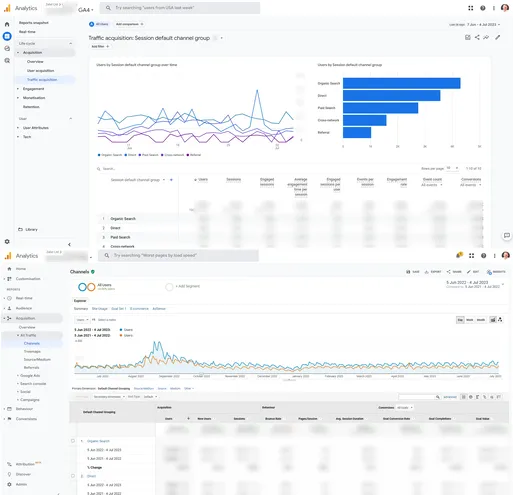
How Is GA4 Different to Universal Analytics?
Previously, Google Analytics measured web visits via desktop, tablet and mobile devices in Universal Analytics, and App visits through Firebase, a separate application.
GA4 combines both web and app data in the same property.
Universal Analytics is session based, whereas GA4 is event or user based, meaning it tries to track a user across whatever device they engage with the property.
Other key differences are: -
- Cookieless and IP-less traffic
Although GA4 can collect cookie and IP data, it is possible to collect data on GA4 without using third-party cookies or collecting IP addresses
- Machine Learning and Artificial Intelligence AI
GA4 uses Machine Learning and AI to predict behaviour and model data, based on samples of data.
- Product Integration
GA4 integrates with a range of other Google products, including Google Ads, Google Search Console, Google Merchant Center, as did GA3, but you can now export data to Big Query for free as a GA4 user, which was previously only available to paying GA360 users.
- Customisable Reports and Dashboards
You can now create customisable dashboards based on the data and KPI’s you want to report on.
- Bounce rate and engagement rate
Although Bounce rate is still reported, it is calculated differently and GA4 focuses on more ‘positive’ engagement metrics.
- Google Tag Manager is now even more important.
A lot of the basic functionality in Universal Analytics could be utilised without the need for Google Tag Manager (GTM), such as configuring a Destination Page Conversion Goal. This is not possible in GA4, as all goals are event-based, so being able to use and configure GTM is essential, especially if you are in ecommerce, or need to create custom events and custom dimensions, or if you have specific data collection or reporting requirements.
- No Data Limits on GA4
Universal Analytics properties were only able to process 10 million hits, 500 hits for each session, and 200,000 hits per user per day, however GA4 has no such data limits.
For a more in-depth comparison of the two platforms, see this piece from Google here.
How Does GA4 Work?
GA4 is a ‘new kind of property designed for the future of measurement’:
- GA4 collects both website and app data in one single view of data, to better understand the customer journey
- GA4 uses event-based data instead of session-based data
- It includes privacy controls such as Cookieless measurement, and non-IP dependent measurement.
- GA4 utilises Machine Learning and AI to offer intelligent behavioural and conversion modelling.
- GA4’s predictive capabilities offer guidance without the need to develop complex models
- Direct integrations to media platforms help drive actions on your website or app
GA4 uses a significantly different data structure and data collection logic, which is why it has not been possible to migrate Universal Analytics to GA4, as has happened in each of the previous iterations of Google Analytics.
Now, everything is built around users and events – not sessions, as we’ve been used to, over the past eighteen years. An events-based model processes each user interaction as a standalone event. By moving to this event-based model, GA4 is more flexible and better able to predict user behaviour, thus allowing you to make informed decisions without the need for complex models.
What are GA4 events?
Events let you measure user interactions on your website or app; for example, you can measure when someone loads a page, clicks a link, or makes a purchase. GA4 comes with a range of preset or templated events, however you can also configure your own, based upon what you want to track. With Google Analytics 4, you can use data from events to create reports with information about your business.
Why is Google Analytics 4 better than Universal Analytics?
Universal Analytics measures screenviews in separate mobile-specific properties, whereas GA4 combines both web and app data in the same property. This means that you now have a single source of information on your users and how they engage with your business or organisation, rather than separate, disjointed views.